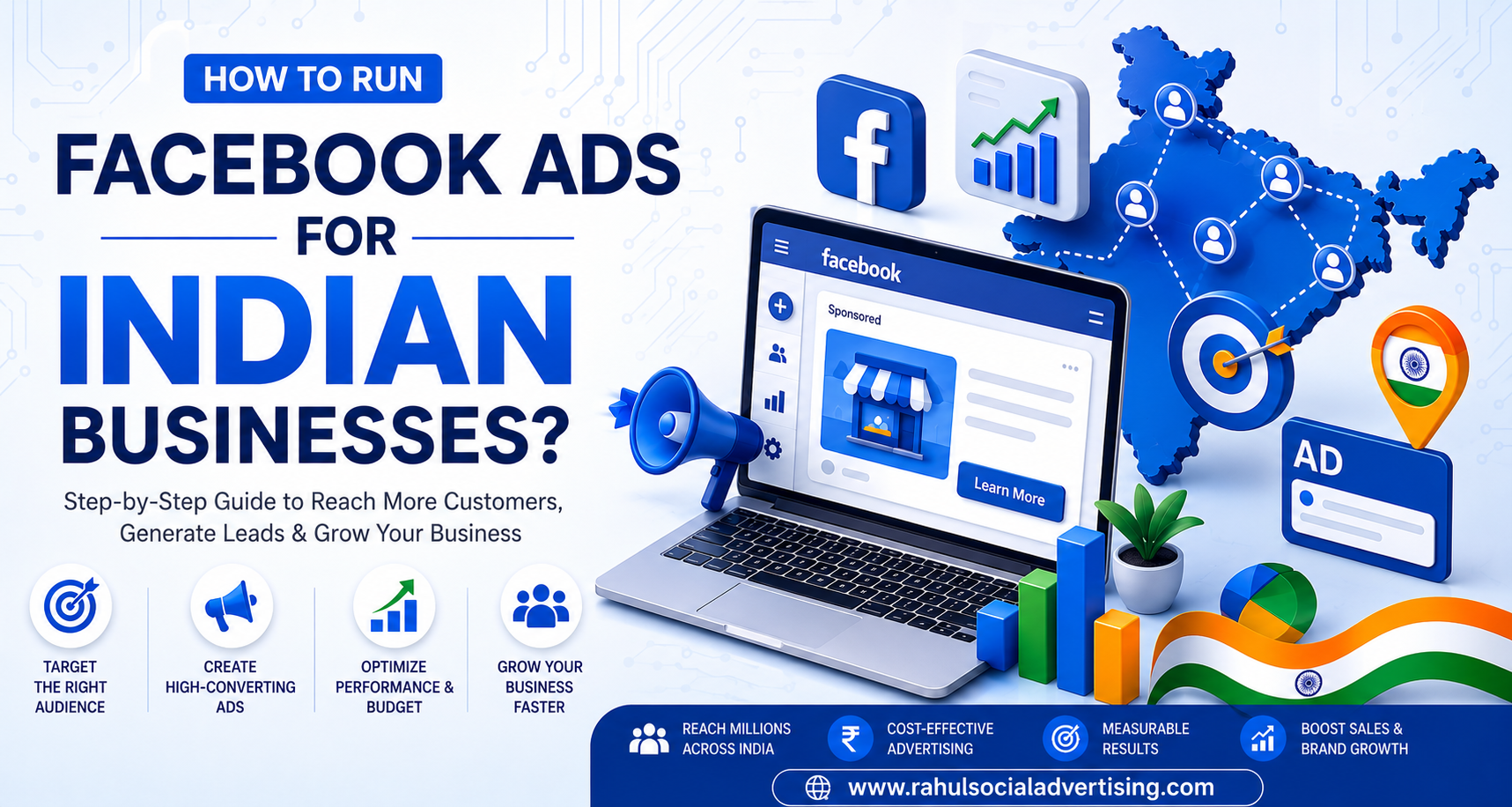
How to Run Facebook Ads for Indian Businesses?
The Indian digital advertising market has been booming in 2026. According to Recent data, the user base for Facebook Ads Agency in India has more than 92% of Meta platform users who are MSMEs. Thus, you must partner with an experienced Facebook ads company in India that helps companies craft their creative posts, target the right audiences, and manage their budget. Industry figures suggest that Meta ads in India deliver low CPCs, even in 2026, when run via Facebook Ads Manager. Given the growing competition in the industry, Indian companies should adopt effective advertising strategies and test ads on Facebook to sustain growth.
What are Facebook Ads?
Facebook advertising is now rebranded as Meta advertising. It further defines your objectives, target audience, and budget for the ad while tracking its performance throughout the process. For example, BforBank (an online bank operating in France) has achieved a 4x increase in brand awareness through Meta ads.
Why Should You Advertise On Facebook?
Facebook ads help Indian businesses reach large audiences, market their products, and generate high-quality leads. Facebook Ad Manager is a platform where all Facebook advertising companies in India can develop marketing strategies based on their customers’ behaviour and preferences.
1. Accurate Customer Targeting
Facebook can access data about its users. Thus, this data is highly actionable. It is also useful to target the customer base. For example, when creating a Facebook Ad, you must target specific demographics such as gender, geographic location, and age groups. But here is the thing: while other platforms that allow advertising also have user data, the difference is that Facebook allows targeting based on someone’s lifestyle. Thus, this includes everything from users’ interests, behaviour, education, and professional experience.
2. Achieve Impressive Results
It will be easy for you after you learn how to make an advertisement on Facebook, as you won’t need much time to succeed. The total earnings from ads on Facebook by 2025 may reach $156.8 billion per year. Furthermore, one dollar spent on Facebook can reach an average of 2,417 individuals, which is 5% better than the previous year.
3. Track The Ad Performance In Real Time
While it is true that Meta stopped using all its Facebook Analytics in 2021, some Meta tools analyse ad performance, including reach, engagement, conversions, and more. Moreover, the information is available in real-time. Hence, it becomes easier for you to optimise your marketing campaign based on its results. All the content management systems allow you to do this. With this pixel, you can also track the effectiveness of your Facebook ads.
How To Create & Run Facebook Ads?
In this section, we’ll guide you to create your first-ever Facebook ad. In this section, we will base our instructions on the latest version of the Meta Ads Manager tool.
1. Creating Your Ad
Press the green “Create Ad” button.
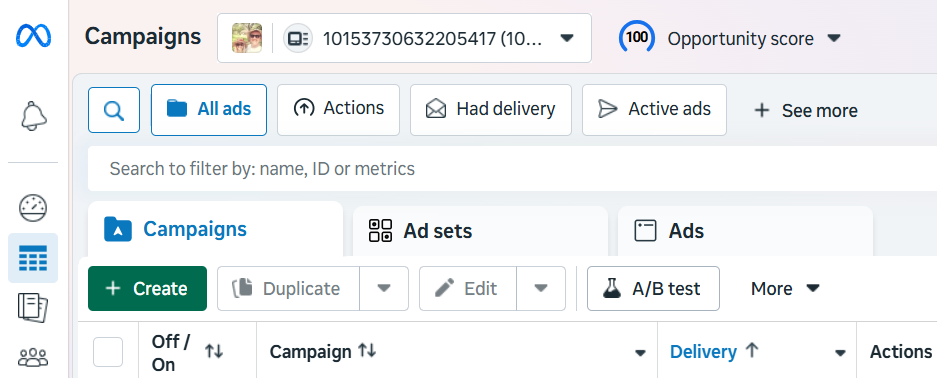
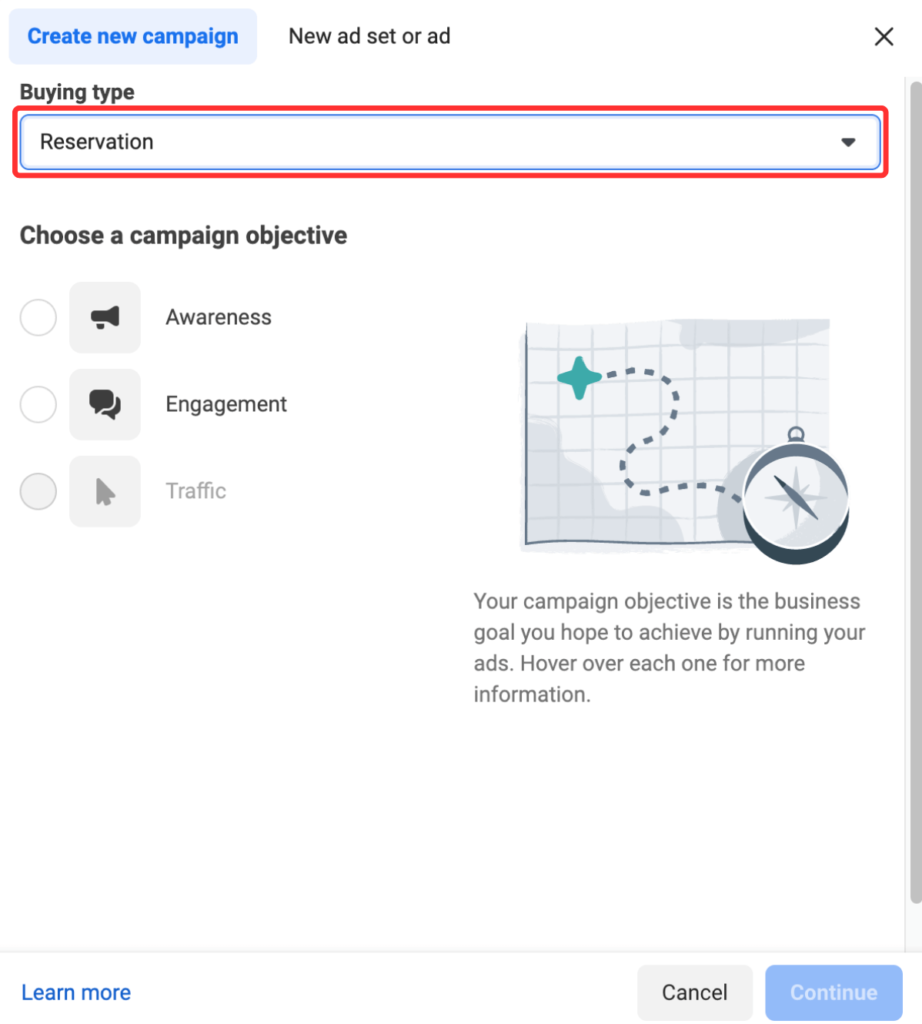
Then Meta will direct you to another page where you can choose a buying type and your campaign goal.
2. Select A Buying Type
Two types of ads are available on Meta: “Auctions” and “Reservations”. Here are a few details of different types of ads:
A. Auction: It offers a lot more flexibility and efficiency, but predictability is not very high. The ads appear on Facebook, Messenger, Instagram, and Meta Audience Network.
B. Reservation: The campaign can be reserved beforehand with known performance targets and controls performed regularly.
The basic difference between Auction and Reservation is the creation of campaigns and their purpose. For instance, in an auction, you can set several campaign purposes. In Reservations, there are only two purposes – awareness and engagement.
If you cannot decide the right type of ad for you, you must consider this Meta guidance.
3. Select Your Campaign Aim
Facebook gives you the freedom to create your own ads tailored to your end goal. You can choose from 6 different options:
- Awareness: It will primarily be visible to individuals who can remember it. According to Meta, increasing brand awareness helps reach your target audience, drive views, and boost sales.
- Traffic: The ad type directs viewers to a specific destination, such as your website, an event, or downloadable material. Such ads are most effective at driving link clicks, landing page visits, and calls.
- Engagement: It increases your chances of people reaching out through messages, in-app purchases, and comments. They are further effective in video views, conversions, and calls.
- Leads: The lead type of ads gathers information from your target audience. They collect leads through forms, conversions, and calls.
- App Promotion: You can use them to generate more app users, as well as increase retention among existing ones.
- Sales: You will encounter individuals interested in purchasing your products/services. Sales will help you drive more conversions and in-app purchases.
4. Choose A Suitable Ad Campaign Name
After choosing a marketing goal, you’ll need to allocate a name to your campaign. But you must ensure it is something clear and easy for all involved in developing ads.
5. Declare Your Ad Category
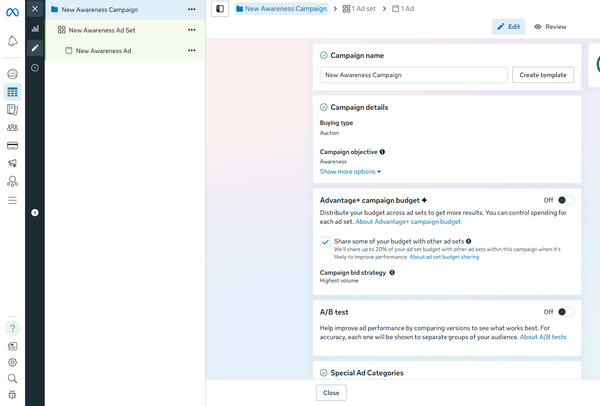
Advertising regulations vary from country to country. This is further true about sensitive topics such as real estate, social issues, elections, and politics. If your advertisement belongs to any of these areas, you may consider disclosing it so that it conforms to the advertising guidelines of Facebook and other countries.
6. Decide to Enable or Disable A/B Testing
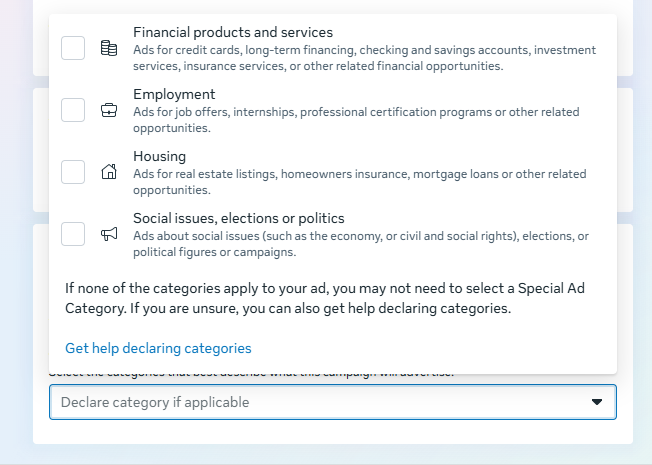
Apply A/B testing to experiment with different images, copy, audiences, or locations to improve your ad campaign’s performance. Thus, this is all part of a bigger setup that will come in due time.
7. Determine Whether To Use Advantage+ Campaign Budget
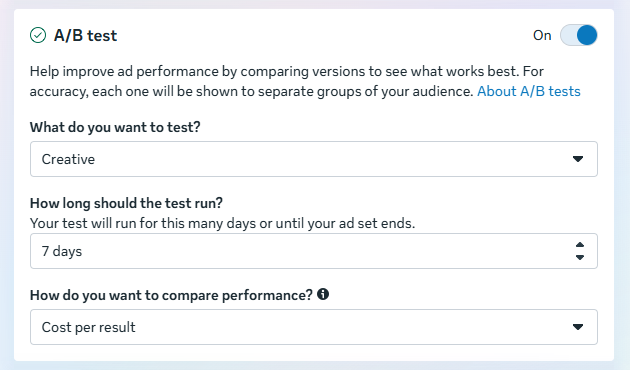
If you opt for Auction mode, Facebook will identify the best places to run your ad sets. It will also help you distribute your campaign budget in real time to achieve the best results. Advantage+ campaign budget (previously known as campaign budget optimisation) greatly helps your campaign with many ad sets.
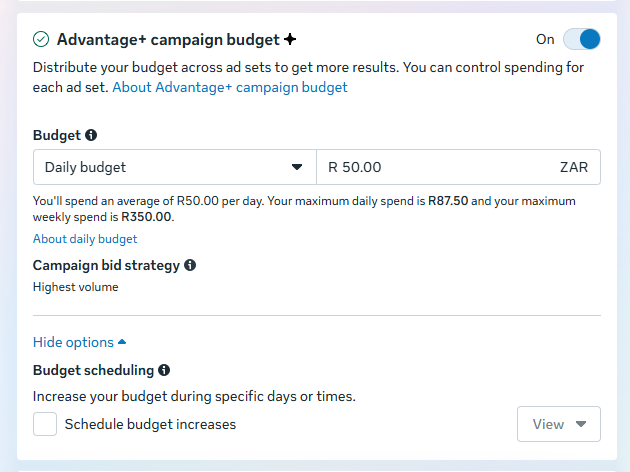
8. Determine Your Performance Objective
Be precise about your objectives when creating a Facebook ad. For each campaign goal outlined in step 3, there’s a unique list of performance objectives to choose from. Take awareness, for instance: you can either choose something general, like “maximise reach,” or something more specific, like “maximise two-second continuous video views.” As a beginner at creating Facebook ads, you may find it helpful to experiment with general objectives before settling for something specific.
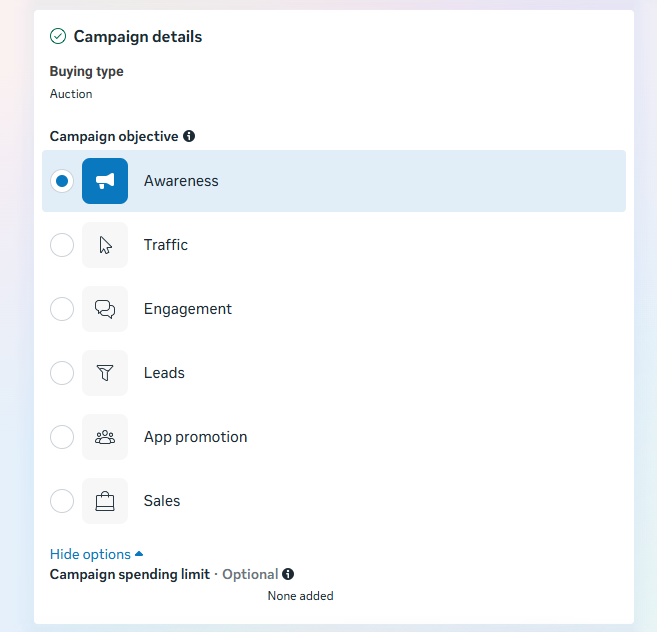
9. Choose How Much And When You Want To Spend On Advertising
When setting an advertising budget, keep in mind that this value represents the upper limit of your spending. You can further set your daily and campaign budgets.
- Daily: You can set a daily advertising budget. Your ad will appear at the right place and at the right time based on the criteria you set. As soon as you allocate the budget, your advertising stops until the next day begins.
- Lifetime: You spend no more than the amount on your advertising during the period you have determined. Facebook will spend your funds based on your ad’s performance until it reaches the budget you set.
Click the “Next” button to move on to the next step.
10. Personalise Your Target Audience
Recently, Meta updated the audience customisation settings in the Ads Manager. Presently, there are 3 categories to choose from: location, age, and language.
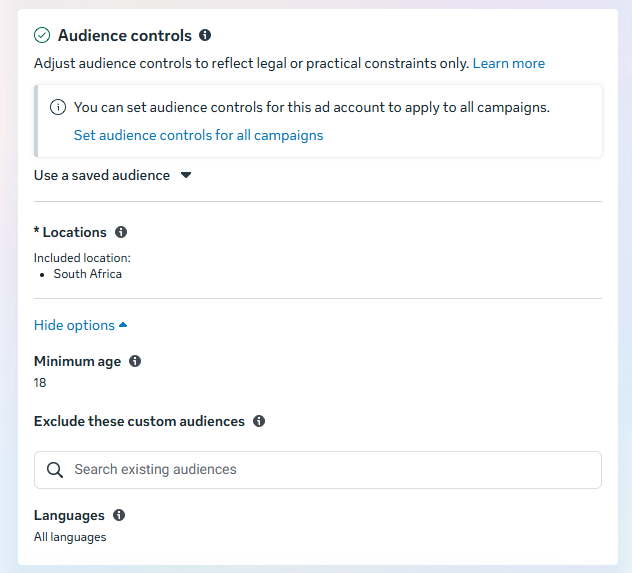
However, if you wish to go into more detail, rest assured that the new Meta Advantage+ audience feature covers all your ad targeting needs.
How? Well,
“Meta’s AI considers countless signals to determine your audience, adapting as it evolves & learns. With the latest model advancements, Meta uses millions of signals to uncover the right message for the right audience at the right moment.”
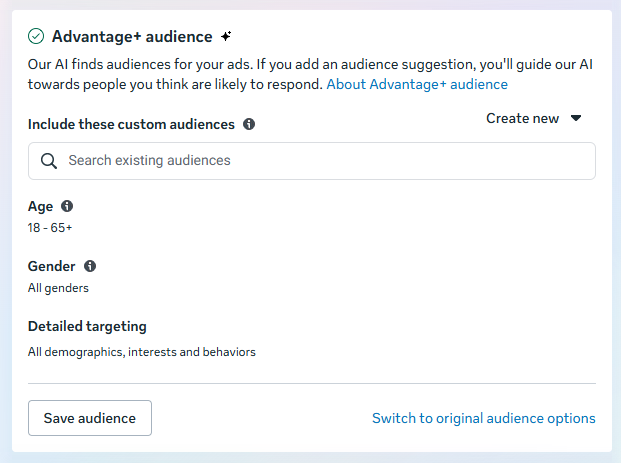
The good thing about this is that users of Meta Ads Manager who know their target audiences so well will be happy. This is further because custom audiences are still available and have even been rolled back to their early state.
11. Select Your Ad Placement
Placement refers to the places your ads will run for your target market. There have been some changes at Meta about placement options. For instance, the Advantage+ placements have been developed using AI technology.
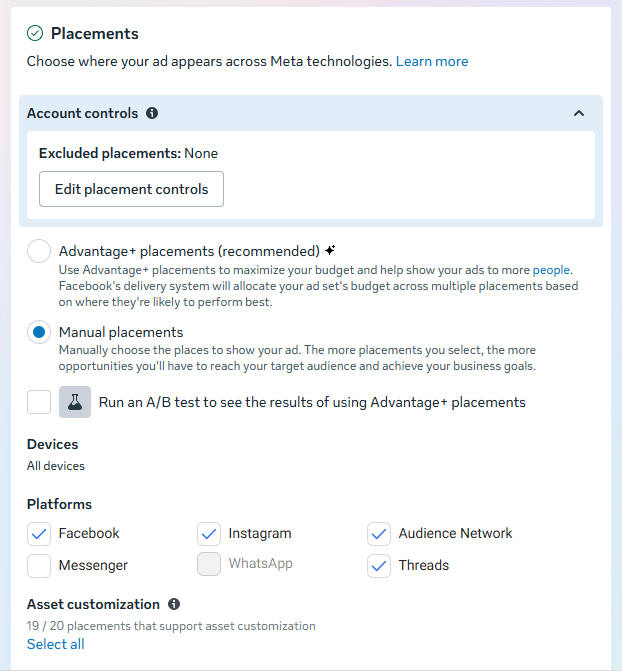
Choose your ad placements using the Manual Placements setting shown in the images above. You will then be presented with the following choices:
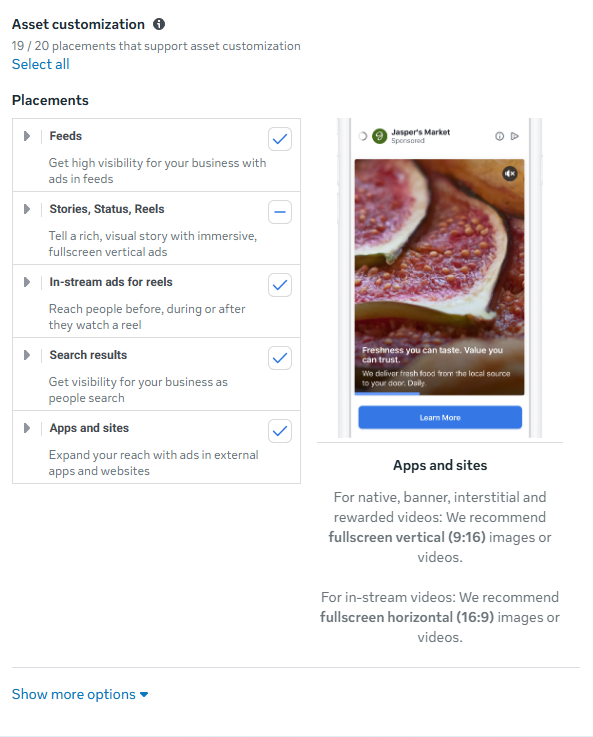
Here are some possibilities within the range of the Facebook group:
- Feeds: Advertise your products to maximise your company’s exposure.
- Stories, Status, and Reels: Share an engaging narrative with vertical full-screen ads.
- In-Stream: Capture people’s attention immediately while they watch video content.
- Search Results: Get exposure for your company while people browse.
- Messages: Offer updates and deals to people who are already engaged with your company.
- External Apps/Sites: Reach out to customers on external applications and websites.
For further information, visit the Facebook guide on advertising placements.
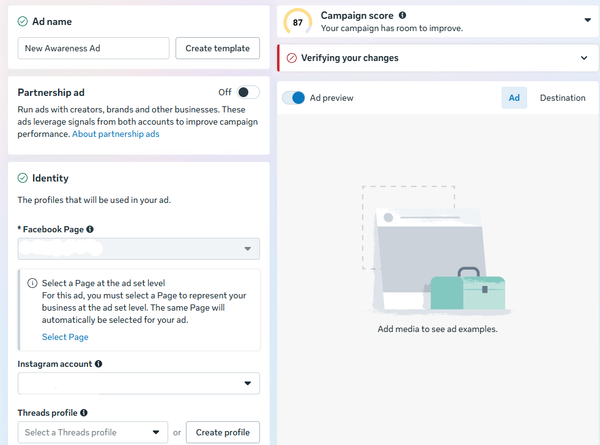
12. Select Your Social Accounts
In the next screen, select the Meta social media accounts where the ads should appear.
13. Select Your Ad Format
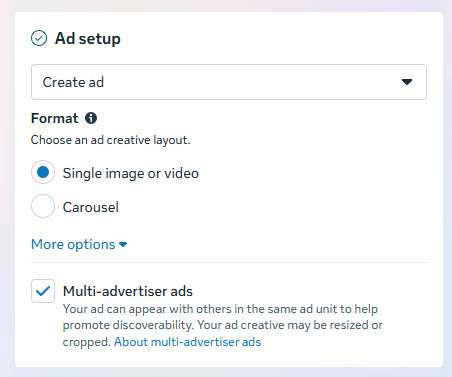
From Ad setup, you can create a new ad campaign, use an existing post, or select a mock-up from the Creative Hub in Meta Ads. After creating a suit, choose whether your ad should be in image, video, or carousel format.
14. Include Your Media And Duplicate
This is where the excitement begins; include your photos & videos. Your images or videos will be uploaded and used to create carousels or video ads.
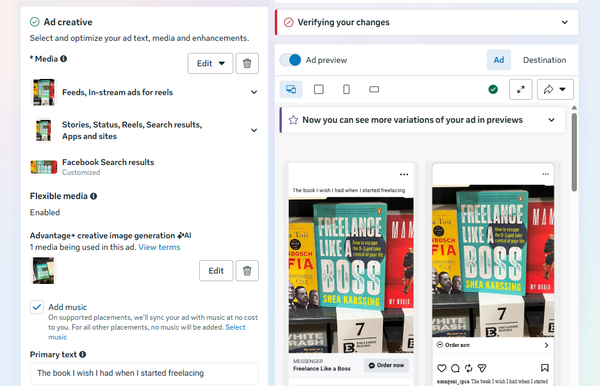
For this category, you can change your ad copy and creative depending on the different sections within Facebook. Towards the bottom of this section, you can further select your music for any formats that allow for this option. You can also create your ad copy using the variety of text options available in this section. Remember to include your CTA.
15. Select Your Destination
As you would expect, there are many factors to consider when selecting the destination for your ad. Hence, this is where Facebook redirects people after clicking on your ad.
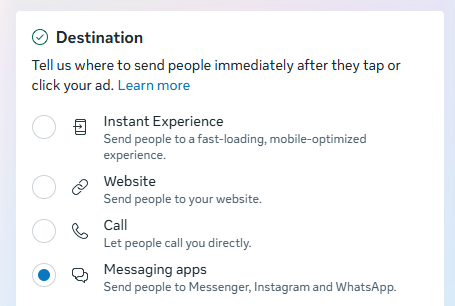
For example, there’s Instant Experience (formerly called Canvas). These help Facebook ensure that your audience isn’t leaving its app. In simpler terms, they are dynamic landing pages, forms, or lookbooks that you can build on Facebook.
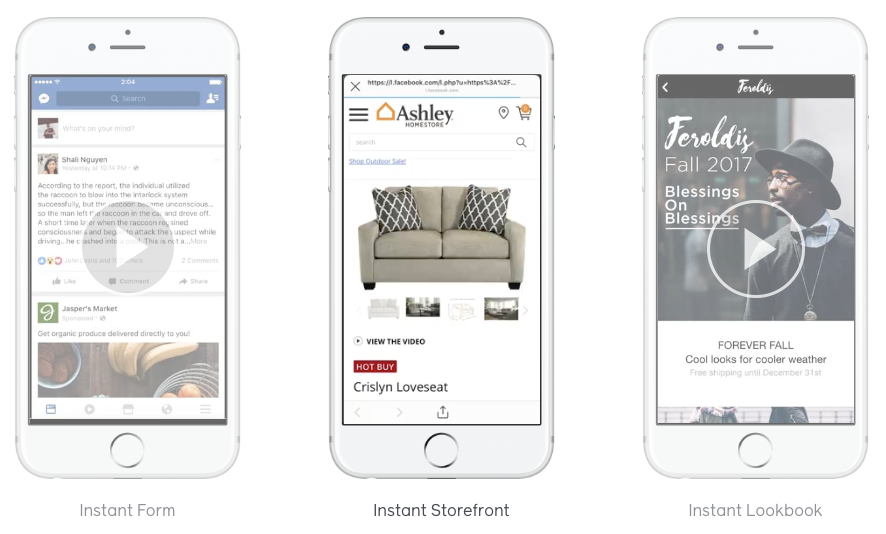
You can further customise your URL and add your own UTM tracking code. Moreover, you can also send them to your inbox via Facebook Messenger, Instagram, or WhatsApp.
16. Publish Your Ad
Click on the “Publish” button at the bottom right-hand side of the screen. After publishing your ad, Facebook will put your post under review to ensure it meets all criteria. This process may take up to 24 hours. Once the review is complete and your campaign meets all criteria, it will automatically be published.
How to Find The Right Facebook Ads Company in India?
Selecting an appropriate Facebook ads company in India helps businesses achieve effective ad results at controlled costs. It further ensures that the selected Facebook ads company understands audience targeting, campaign optimisation, and the appropriate use of Facebook Ads Manager.
1. Before connecting with a Facebook ads company in India, businesses must check the agency’s past performance and the results of its campaigns. This process further helps businesses ensure that the agency can control Facebook campaigns. It will also help them achieve measurable results through various advertising formats.
2. A good ad agency should know how to use Facebook Ad Manager to reach its target audience, manage its budget, track conversions, and optimise its campaign. Thus, you must ensure the business can measure performance and optimise its campaigns.
3. Choosing a Facebook advertisements company also requires effective communication & reporting. Companies must work with businesses that provide regular reporting. They should also explain campaigns in detail so they can understand performance, spending, audience coverage, and campaign progress.
4. Organisations looking for the best Facebook ads company in India must find an agency that customises advertising campaigns. A reputable Facebook ads company always considers business objectives, consumer behaviour, and competition. Then, it plans campaigns in the Facebook Ads Manager and uses audience targeting features.
Hiring an organisation experienced in managing Facebook advertising campaigns is beneficial. This is further because it allows them to run efficient campaigns targeted to the right audiences. Facebook Ads Manager, audience targeting, and campaign tracking are important for successful Facebook advertising.
Top 5 Facebook Ads Agency for Indian Businesses
Now you understand why you should advertise on Facebook, how to do it, and how to find the right Facebook marketing firm in India. So, you must know about the top 5 Facebook ads agency for indian businesses:
Rahul Social Advertising
Rahul Social Advertising operates as a Performance-Driven Facebook Ads Agency. Also, its systems for lead generation and scalability help e-commerce brands and service-based businesses. Rahul Social Advertising has extensive experience managing Facebook and Google Ads campaigns for more than 10 years.
It manages advertising budgets exceeding $1M monthly. Rahul Social Advertising is one of the Top 1% Facebook Ads agencies in India, and has executed 1000+ projects in many industries. The company has achieved a total ROAS of 7x for an 8-figure company. Moreover, they have generated over $1 million in advertising revenue.
Services Offered:
- Facebook Advertising Campaign Management
- Google Advertising Campaign Management
- Conversion tracking setup (Pixel & API)
- Advertising creative design
- Sales funnel creation for lead generation
- Facebook Pixel installation
- White-label Facebook marketing
- Facebook Ads training program
Company Strengths:
- Campaign Management With Proper Testing
- Focused On Accurate Tracking And Performance
- Ability To Manage All Budgets
What Makes It Unique?
Rahul Social Advertising has been selected as an Agency to manage Facebook ads for Ecommerce companies. This is further because its marketing strategies are process-oriented. Moreover, it measures success by outcomes rather than quick solutions.
Performance Marketing Packages:
- Retainer Campaigns Management Monthly
- Performance Scaling Packages
- Budget-Specific Packages
Best Suited For:
- E-commerce Companies
- Service Companies
- Start-up Companies
- SMBs
Areas Of Expertise:
- Performance Marketing
- Facebook Ads
- Google Ads
- Lead Generation
- Conversion Rate Optimisation
- Paid Social Media Ads
Contact Details:
Phone: +91 89684 58211
Email: salesteamrahulsocial@gmail.com
Office Address: #134 3rd Floor, KB Tower, Mohali, Punjab, India
eCommerce Ads Agency
eCommerce Ads Agency provides an advertising solution to help e-commerce stores boost sales through targeted Facebook & Instagram ad campaigns. This agency specialises in Shopify and WooCommerce websites. Moreover, it aims to achieve higher conversion rates and lower cost per acquisition. These professionals offer services in audience targeting, creative testing, retargeting campaign management, and performance tracking.
Contact Details:
Phone: +91 8544957212
Email Address: ppc.guyz19@gmail.com
DigiHawks Marketing
DigiHawks Marketing provides budget Facebook advertising services to young enterprises & startups in India. They specialise in designing cost-effective campaigns that boost brand awareness, generate leads, and enhance customer engagement. Additionally, their experienced staff assists clients in creating advertisements, optimising campaigns, and identifying target audiences. This agency provides all the necessary services at an affordable price, making it a great choice for any business.
Contact Details:
Phone: 073411 12226
Office Address: E328, Industrial Area, Sector 75, Sahibzada Ajit Singh Nagar, Punjab, India, Pin – 140307
Marketing Masala
Marketing Masala is a social media advertising agency that offers marketing solutions to help brands increase their online visibility and better engage with customers. They create compelling ad content and target your audience effectively, helping your Meta Ad campaigns perform better on platforms like Facebook and Instagram. Marketing Masala also helps businesses create remarketing campaigns and video ads and monitor their performance.
WordStream
WordStream is a popular online marketing firm that specialises in helping companies manage their social media advertising on Facebook and Google. They help businesses by making their campaigns easier to manage and by providing useful information. The examples include how to create an advertisement, which audience to target, and how to optimise campaigns. WordStream is the ideal firm for companies requiring both technology and guidance in online marketing.
Conclusion
Facebook advertisements are now among the best ways for Indian businesses to increase brand visibility and generate better leads and sales. They can use software such as Facebook Ads Manager. Thus, this allows them to focus on a specific audience, set budgets, measure conversions, and optimise ads based on performance.
There are several important steps to take before creating any Facebook ads, including thorough planning, audience analysis, high-quality content creation, and continuous testing. Also, there is information about how companies should choose an appropriate Facebook ads agency in India.